Securing a Vulnerable AWS Architecture: A Redesign Case Study
Auditing an AWS environment with public EC2s, open SSH, leaky file URLs and a single-AZ database — then redesigning it with private subnets, CloudFront + S3, ALB + Auto Scaling, RDS Multi-AZ and EFS.
Overview
This was my Cloud Computing Security course project: take an AWS environment that grew organically and badly, find everything wrong with it, and redesign it properly.
The company in the scenario, MedLearn Nexus, runs three systems in one AWS Region and one VPC:
- a public e-learning platform used by students in many countries
- an internal clinical imaging platform that processes medical images
- a collaborative workspace for internal teams
Each was built by a different team over time, with no shared architecture plan — and it shows.
This is a design case study based on a course-provided scenario. No real company or live environment was involved.
The Starting Point
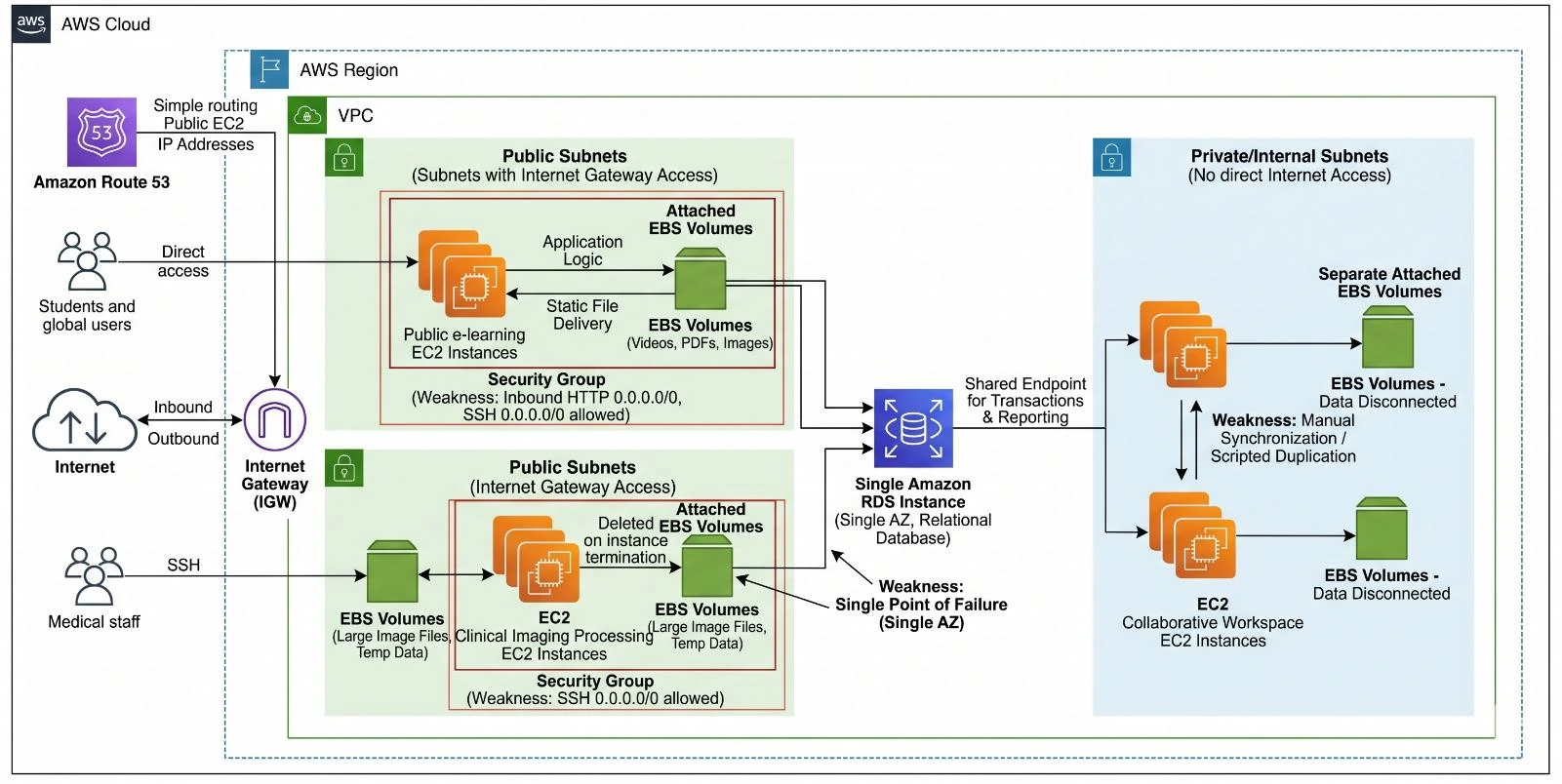 The current environment: public EC2s, EBS everywhere, and one Single-AZ RDS shared by all three systems
Following a request through the current setup:
- Route 53 resolves the domain straight to the public IPs of EC2 instances.
- Those same EC2s run the application and serve every video, PDF, image and JavaScript file from attached EBS volumes.
- Clinical staff SSH directly into imaging instances in public subnets to upload files.
- The workspace instances each keep their own EBS copy of shared datasets, synchronised by hand and by script.
- All three systems — transactions and heavy reporting queries — hit one RDS instance in one Availability Zone.
What’s Wrong With It
Security
| Issue | Why it matters |
|---|---|
| EC2 instances with public IPs, receiving HTTP directly | Every server is part of the attack surface |
Security Groups allowing SSH from 0.0.0.0/0 | Open to brute-force and credential attacks from anywhere |
| Course files reachable by direct URL after access expires | No real access control on private content |
| Broad, shared Security Groups between workspace instances | One compromised instance can move laterally |
| One shared database for all three systems | A compromise in one system puts the others’ data at risk |
| Imaging volumes set to delete on termination | Medical images and results can simply disappear |
Performance, scalability and cost
- EC2 does two jobs. Application logic and large file downloads compete for the same CPU, memory and network — exactly when exam traffic peaks.
- Global students, one Region. Everyone downloads large files from the same place, so distant users get high latency.
- Scaling means copying. Adding an EC2 means copying all static files onto its EBS volume.
- Reporting slows production. Heavy queries run on the same database as live transactions.
- Single points of failure. One RDS instance in one AZ; one AZ for the app servers.
- Wasted storage. Current lectures, old semesters and archives all sit on the same expensive storage, and the workspace keeps duplicate datasets on separate volumes.
Most of these trace back to one root cause: using the wrong service for the job — EC2 as a file server, EBS as shared storage, a single database as a data warehouse.
The Redesign
1. Network: nothing private faces the internet
The VPC is rebuilt into layers, each in multiple Availability Zones:
| Layer | Contains | Reachable from |
|---|---|---|
| Public subnets | Application Load Balancer only | The internet |
| Private application subnets | E-learning EC2 instances | The ALB only |
| Private processing subnets | Clinical imaging EC2 instances | Required services only |
| Private internal subnets | Workspace EC2 instances | Each other, via EFS |
| Private database subnets | RDS primary, standby, read replica | Application Security Groups only |
Security Groups reference each other instead of IP ranges, so each layer only accepts traffic from the layer in front of it:
1
2
Internet ──HTTPS──▶ sg-alb ──▶ sg-app ──3306/5432──▶ sg-db
                                   workspace EC2 ──NFS 2049──▶ sg-efs
Public SSH is removed entirely. Administrative access goes through AWS Systems Manager Session Manager (or a VPN / bastion host restricted to trusted ranges) — no inbound port 22 on anything.
2. Static content: S3 + CloudFront, with real access control
Videos, PDFs, images and scripts move off EC2 into a private S3 bucket, delivered by CloudFront from edge locations close to each student.
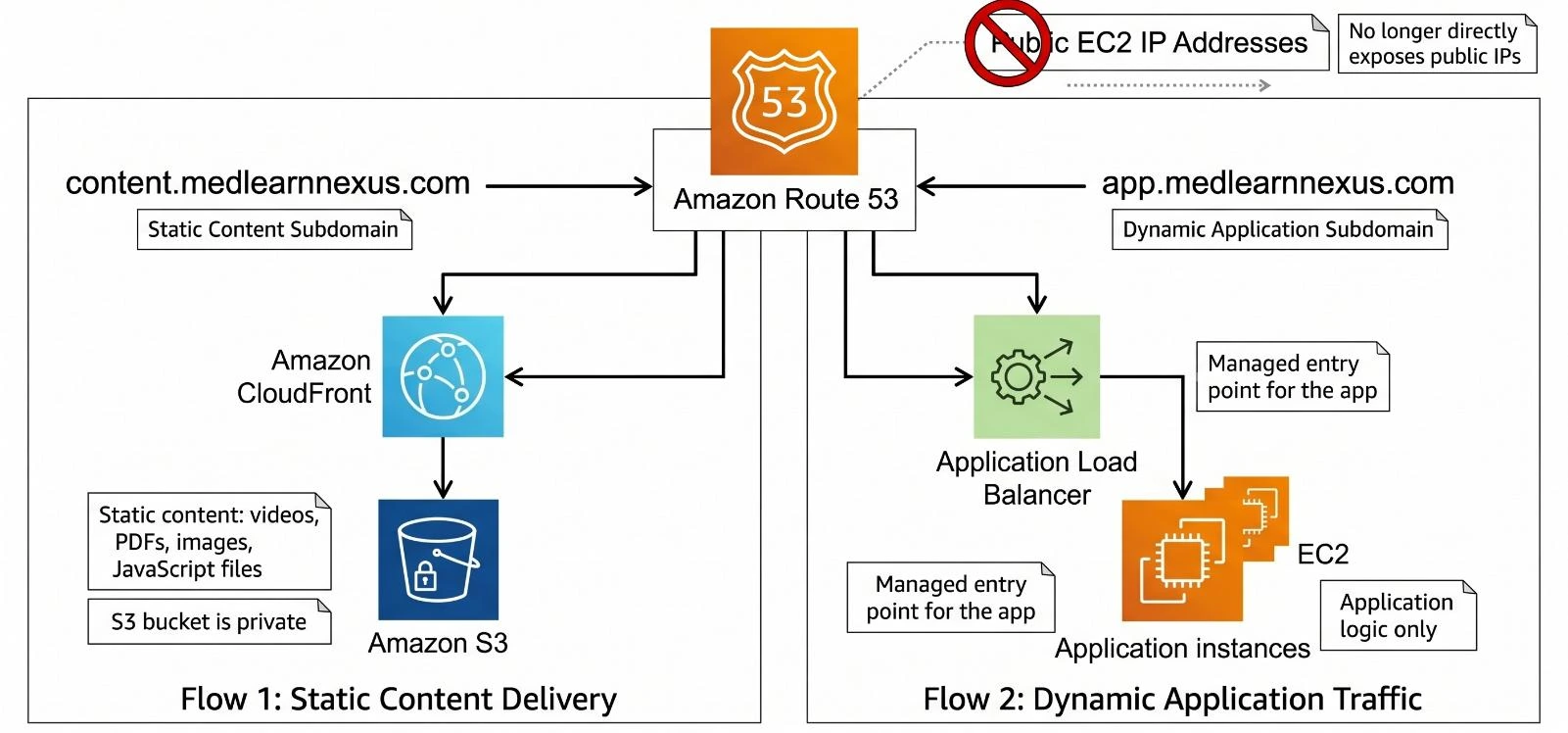 Route 53 now points to managed entry points: CloudFront for static content, the ALB for the application
- The bucket blocks all public access. Only CloudFront can read it, through an Origin Access Control and a bucket policy.
- Private course material is served with CloudFront signed URLs or signed cookies that expire. This fixes the “link still works after access ends” problem at its root.
- EC2 instances stop serving files entirely, which cuts their load and lets the app scale on application demand alone.
3. Compute: load balancing, Auto Scaling and stateless servers
The e-learning app runs in an Auto Scaling Group behind an Application Load Balancer, across at least two AZs:
- The ALB is the only public entry point and health-checks instances, routing around failures.
- The ASG adds instances during exams and registration, and removes them when traffic drops.
- If one AZ fails, the ALB keeps serving from the others.
Because instances come and go, sessions can’t live in instance memory:
| Option | Strengths | Weaknesses |
|---|---|---|
| ElastiCache (Redis) ✓ | Very fast, built for short-lived data | Another service to run |
| DynamoDB | Fully managed, durable, scales easily | Slower than Redis for session reads |
| ALB sticky sessions | Simple | Uneven load; sessions lost when an instance is replaced |
| Local EC2 memory | Simplest | Breaks with Auto Scaling |
4. Storage: the right service for each workload
| Workload | Service | Reason |
|---|---|---|
| E-learning static files | S3 | Object storage, shared by all instances, lifecycle management |
| Clinical working data | EBS | Fast block storage attached to the processing instance |
| Uploaded medical images and final results | S3, encrypted | Survives instance termination, independent of compute |
| Collaborative workspace | EFS | One shared file system mounted by many instances, no manual sync |
| Sessions | ElastiCache | Fast, temporary |
| Secrets and configuration | Secrets Manager / Parameter Store | Kept out of code, databases and shared drives |
For e-learning content, an S3 lifecycle policy moves data to cheaper storage as it ages:
| Content | Storage class |
|---|---|
| Current semester material | S3 Standard |
| After ~90 days / end of semester | S3 Standard-IA or Intelligent-Tiering |
| After ~180 days | S3 Glacier Flexible Retrieval |
| After 1–2 years (long-term records) | S3 Glacier Deep Archive |
| Generated previews and thumbnails | Deleted after 30 days |
5. Database: available, and protected from reporting load
- RDS Multi-AZ keeps a synchronous standby in a second AZ with automatic failover. That’s for availability, not speed — the standby doesn’t serve reads.
- Read replicas take the reporting and analytics queries, so production transactions aren’t slowed down.
- The database sits in private subnets, accepts connections only from application Security Groups, and is encrypted, with protected backups and snapshots.
- Large files, sessions, temporary data and secrets move out of RDS to the services above. The database keeps what it’s good at: structured application data.
6. Identity, encryption and logging
- IAM least privilege: app instances can read course objects but not delete the bucket. Imaging instances can reach imaging data but not e-learning content. No day-to-day use of the root account.
- Encryption at rest on S3, EBS, EFS and RDS; HTTPS everywhere in transit.
- CloudTrail for account activity, plus S3 access logs / CloudTrail data events on sensitive buckets. When it’s medical data, you need to know who touched what, and when.
The Final Architecture
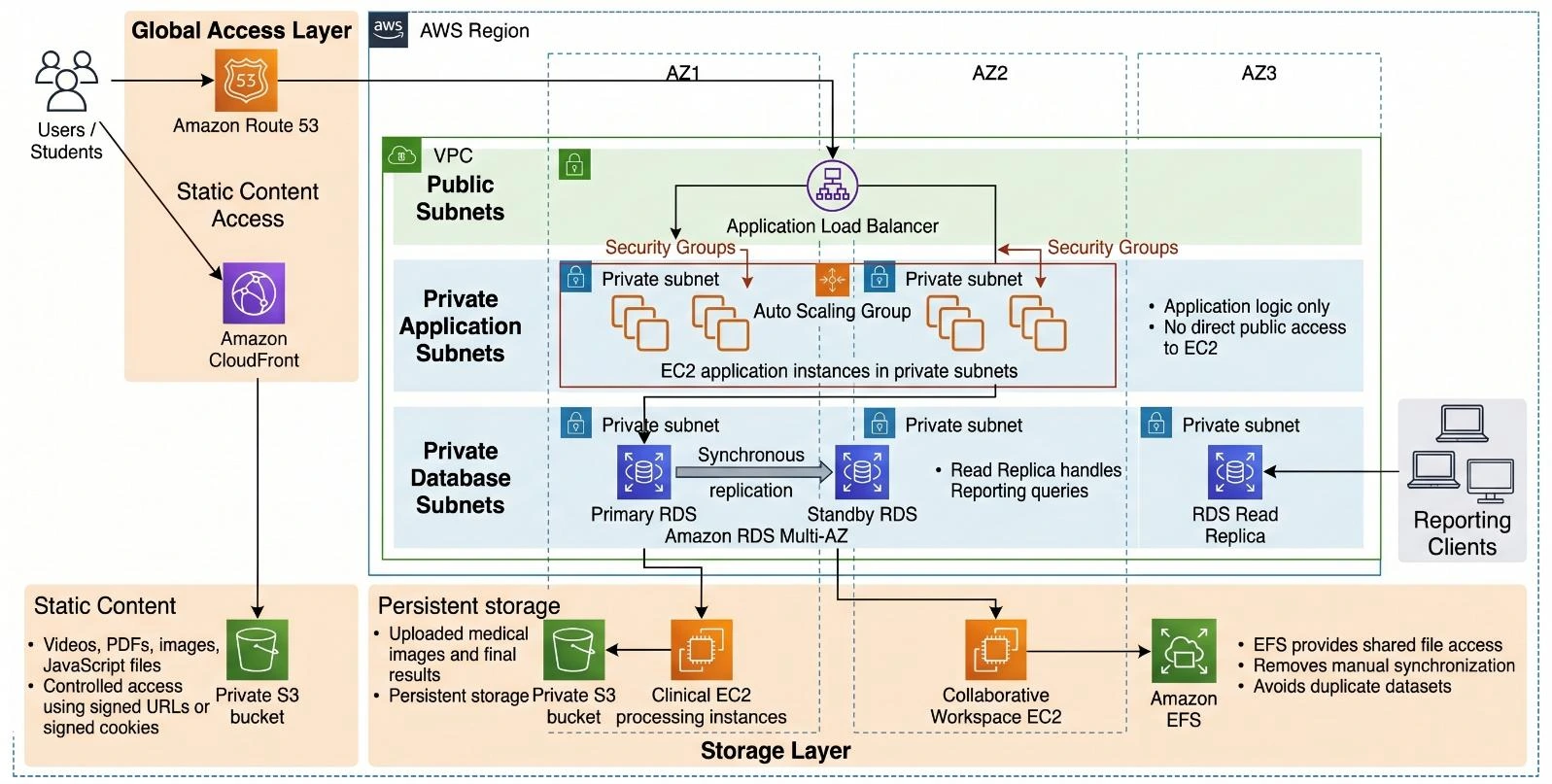 The redesign: CloudFront and the ALB as the only entry points, private subnets for every workload, RDS Multi-AZ with a read replica, EFS for shared files
| Before | After | |
|---|---|---|
| Entry point | Route 53 → public EC2 IPs | Route 53 → CloudFront / ALB |
| Admin access | SSH from 0.0.0.0/0 | Session Manager, no public port 22 |
| Static files | Served by EC2 from EBS | Private S3 + CloudFront, signed URLs |
| App servers | Public subnets, fixed count | Private subnets, Auto Scaling across AZs |
| Security Groups | Broad and shared | One per layer, referencing each other |
| Clinical data | EBS, deleted on termination | Encrypted S3 for inputs and results |
| Shared files | EBS copies + manual sync | EFS |
| Database | Single-AZ, does everything | Multi-AZ + read replica, private, encrypted |
| Storage cost | Everything on the same tier | Lifecycle policy across S3 classes |
Conclusion
The original environment’s problems looked like a long list — exposed servers, open SSH, leaky URLs, slow downloads, a fragile database, rising costs — but they shared one cause: services used for jobs they weren’t built for.
Key takeaways:
- Only managed entry points face the internet. CloudFront and the ALB, nothing else.
- Security Groups should reference each other, not CIDR ranges, so each layer accepts traffic only from the layer in front of it.
- Kill public SSH. Session Manager gives audited access with no open ports.
- Signed URLs fix expired-access leaks that no amount of web server configuration will.
- Multi-AZ is for availability, read replicas are for read performance — they solve different problems.
- Pick storage by access pattern: S3 for objects, EBS for one instance, EFS for many.